
When you were growing up, your mom and dad probably hid a spare house key near the front door in case someone in the family got locked out. Few homeowners do that anymore. We’ve grown too concerned (and rightly so) about home security. However, many people still leave easily findable “keys” lying around when it comes to their financial accounts — in the form of easily guessable or easily stolen sign-in information.
In an era when digital access is the gateway to our financial lives, reliance on weak, reused, or unprotected credentials is a significant vulnerability. Although exact numbers are elusive, investigations into unauthorized access incidents suggest that in about 40% of cases, a hacker didn’t “break in” but logged in using legitimate but stolen credentials.
Craft stronger passwords
Cybercriminals know that many people use easily guessed passwords, such as an anniversary date, a child’s name, or the name of a street where the user used to live. These are exactly the password patterns attackers exploit. Using automated tools, hackers can quickly test thousands of combinations.
To counter these threats, security experts recommend using longer, more complex passwords. A password of at least 12 to 16 characters significantly increases the difficulty for an attacker to crack it, especially when it combines letters, numbers, and symbols.
However, even a strong password, if used for multiple accounts, creates a chain-link vulnerability — if one account is compromised, an attacker may gain access to your entire digital footprint. That’s why security experts say it’s crucial that each account has a unique password.
Beyond creating strong passwords, implementing multi-factor authentication (MFA) is perhaps the most effective defense against unauthorized access. MFA can be inconvenient, but it adds an extra layer of verification by requiring a second factor — such as a mobile app notification, a hardware token, or a unique code — before granting access. Even if a thief steals your password, he would still be blocked from your account without this second factor.
Use a password manager
Remembering dozens of unique, complex passwords is impractical (if not impossible!), given the number of accounts the average person manages. Although keeping a written list of passwords may seem like a good solution, it introduces another vulnerability. For example, if someone cleaning your home or office spots your password list and takes a photo of it, that information could then be used to gain access to every account listed.
A safer option is a “password manager.” These applications generate, store, and automatically fill in credentials, allowing users to maintain strong security without the burden of memorizing passwords or the risk of keeping a written list. A password manager requires the user to remember only one master password.
To help keep the master password memorable, you could create a string of words that is meaningful to you but unpredictable to others, such as “A-faithFul-$teward-1Cr4-2!” Using uppercase and lowercase letters, numbers, and special symbols in your password string will create a barrier that is difficult to breach.
Most web browsers now include built-in password managers (typically accessible under “settings”). These managers are convenient but security experts say browser-based managers are vulnerable to specialized malware known as “infostealers” that could expose passwords to a hacker.
Standalone password managers, such as 1Password and Bitwarden, are less vulnerable to malware attacks and other weaknesses, but they may come at a cost. Most standalone products charge a monthly or annual subscription fee. However, a few offer a free tier with fewer features (see table below).
Apple users may want to consider Apple’s Passwords, a free app built into the latest operating systems for iPhones, iPads, and Mac computers. Among other features, the Passwords app flags weak or reused passwords and provides direct links to update them.
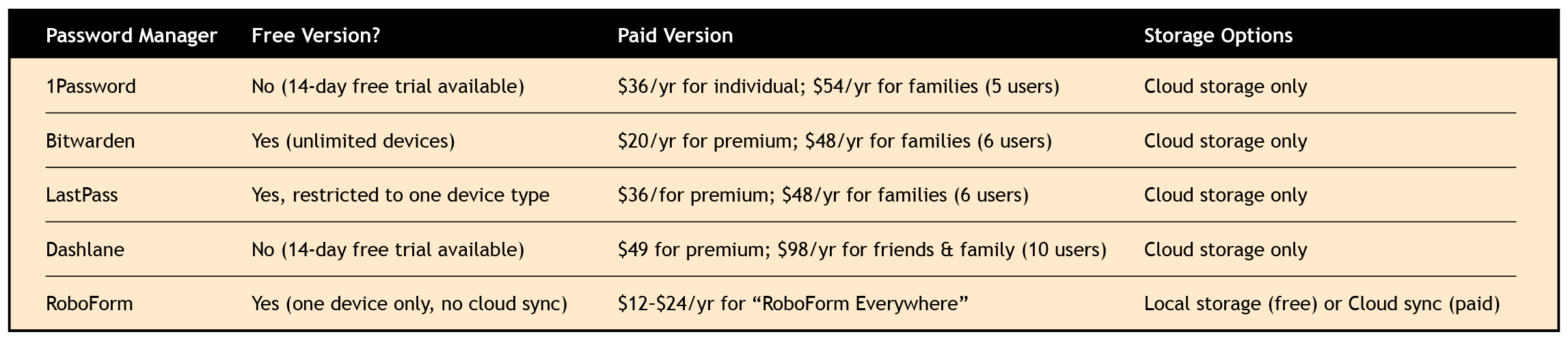
Click to enlarge. Learn more at 1password.com, bitwarden.com, lastpass.com,
dashlane.com, and roboform.com.
Passkeys and biometric ID
Increasingly, websites and apps are adopting “passkeys” — digital credentials that replace traditional passwords. Users can sign in to a site or app using the same code that unlocks their device, thus eliminating the need for a separate password. Some passkeys use “biometric authentication,” such as fingerprint or facial recognition.
Essentially, a passkey pairs a “public” key stored on a website (or in an app) with a “private” cryptographic key stored on the user’s device or password manager. Without both keys, the site or app can’t be accessed, making passkeys highly resistant to hacking.
(If you want to use biometric authentication on more than one device, you’ll need to set up each device separately, because the cryptographic key that your fingerprint or facial scan unlocks is unique to each device.)
Don’t get conned
Strong passwords, multi-factor authentication, password managers, and biometric authentication all help protect against “high-tech” attacks, but users must also guard against a common low-tech means of breaching cybersecurity: the con job.
Cyber thieves routinely impersonate IT support staff, IRS agents, and financial institution personnel to trick people into sharing account information. A call from someone claiming to be from your bank asking for the “one-time code” sent to your phone is a red flag. Legitimate institutions won’t ask you to disclose these codes. Likewise, the IRS will never call to “confirm” your Social Security number or other personal information.
Remain vigilant
Maintaining robust cybersecurity is an ongoing process, not a one-time task. It is crucial to regularly update passwords, monitor accounts for unusual activity, and be wary of suspicious phone calls, emails, and text messages.
By protecting your login credentials with the same care you would use for your house key, you can safeguard your financial assets from criminals who want to unlock your digital doors and let themselves in.